
How to Speed Up a Slow Android Phone (10 Proven Tips)
Introduction: How to Speed Up a Slow Android Phone Easily
If your smartphone is lagging, freezing, or taking too long to open apps, you’re not alone. Many users constantly search for how to speed up a slow Android phone, especially after months or years of usage. Fortunately, you don’t always need to buy a new device to enjoy better performance.
Over time, Android phones accumulate unnecessary files, run too many background processes, and experience software inefficiencies. As a result, performance drops significantly. However, the good news is that there are simple and proven methods to restore your phone’s speed.
For a deeper understanding of Android performance optimization, you can check this official Android guide:
https://support.google.com/android/answer/7667018

In this article, we will explore 10 proven methods to speed up a slow Android phone, along with practical tips to maintain long-term performance.
Why Android Phones Become Slow Over Time
Before diving into solutions, it is important to understand why your phone slows down.
Common Causes of Slow Android Performance
Firstly, several factors contribute to poor performance:
- Too many background apps
- Low internal storage
- Cache buildup
- Outdated software
- Weak or aging hardware
Moreover, as apps become more advanced, they require more resources, which older phones may struggle to handle.
How to Speed Up a Slow Android Phone: 10 Proven Methods
1. Restart Your Android Phone Regularly
First of all, restarting your device is one of the simplest yet most effective ways to improve performance.
When you restart:
- Temporary files are cleared
- Background processes reset
- Memory is refreshed
As a result, your phone runs smoother.
Ideally, restart your phone at least once every few days.
2. Clear Cache to Speed Up Android Performance
Secondly, clearing cache can significantly boost speed.
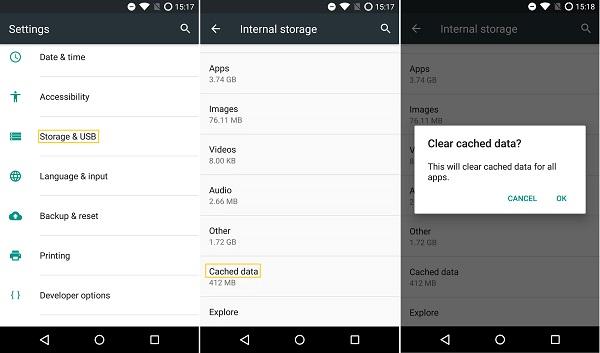
Cache files help apps load faster; however, too much cache can slow down your phone.
How to clear cache:
- Go to Settings
- Tap Storage
- Select Cached data
- Clear it
Consequently, this frees up space and improves responsiveness.
3. Uninstall Unused Apps to Fix a Slow Android Phone
Another important step is removing apps you no longer use.
Unused apps:
- Consume storage
- Run background services
- Drain system resources
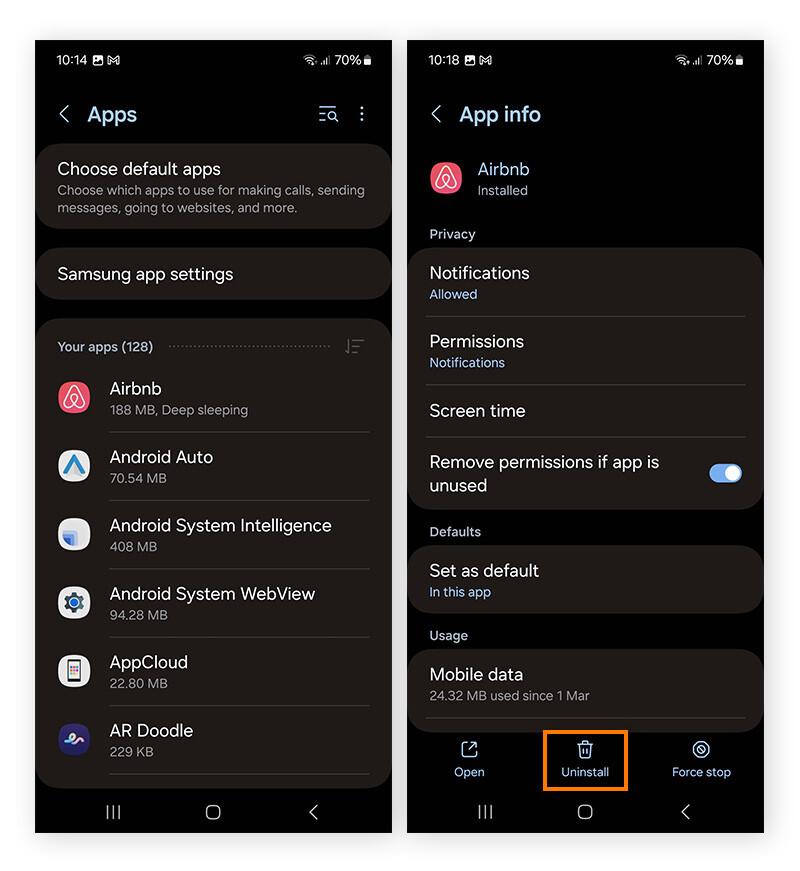
Therefore, uninstalling them helps your phone operate more efficiently.
4. Update Your Software for Better Android Performance
Keeping your phone updated is essential.
Software updates:
- Fix bugs
- Improve performance
- Enhance security
Check for updates here:
Settings-System – Software Update
For more details, visit:
https://support.google.com/android/answer/7680439
5. Reduce Animations to Speed Up a Slow Android Phone
Although animations make your phone look smooth, they can reduce performance.
To disable or reduce animations:
- Enable Developer Options
- Set animation scale to 0.5x or off
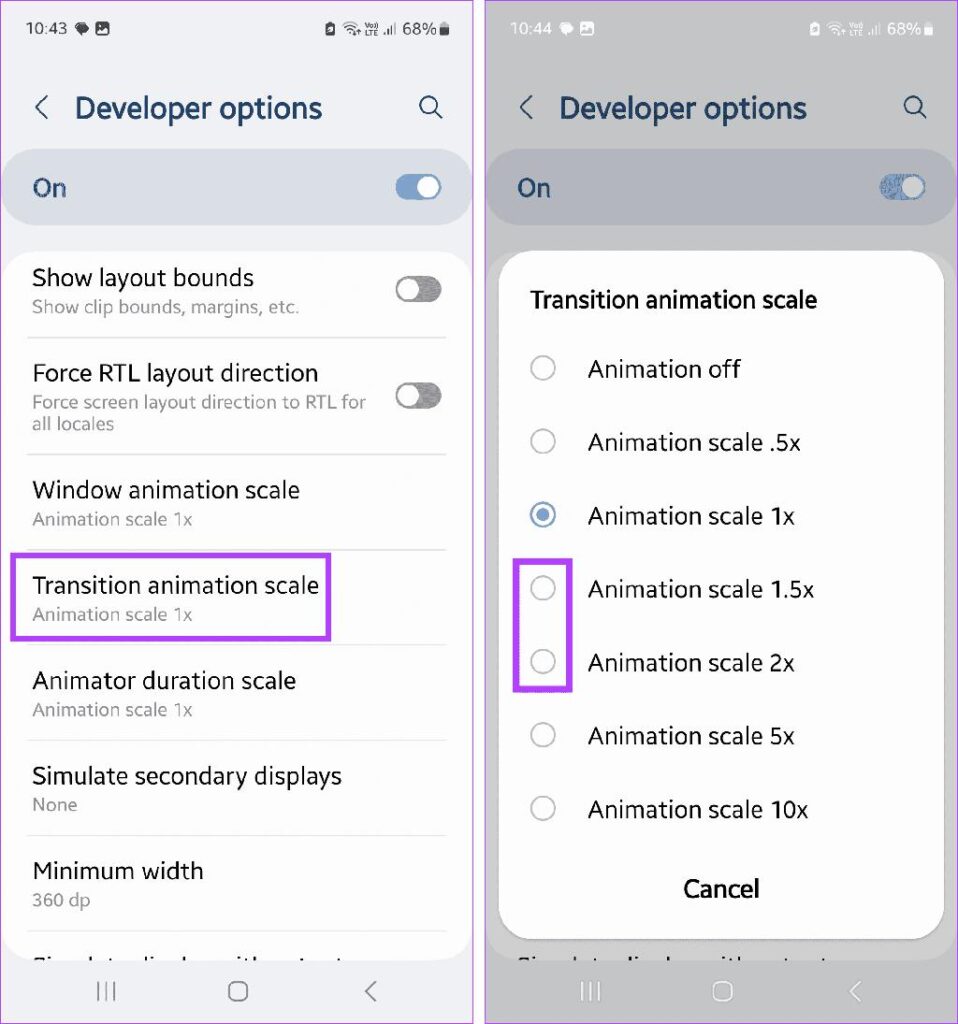
As a result, your phone feels much faster.
6. Free Up Storage Space for Faster Performance
Low storage is one of the biggest causes of slow phones.
When storage is full:
- Apps slow down
- System performance drops
- Updates fail
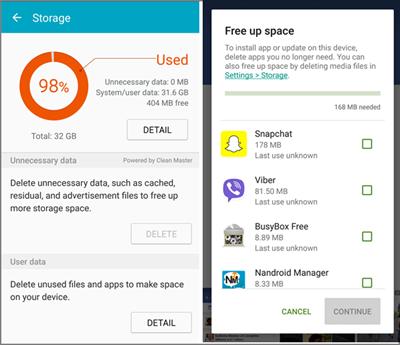
What to delete:
- Old photos and videos
- Unused files
- Downloads
Keep at least 20-30% storage free
7. Use Lite Apps to Improve Android Speed
If your phone is low-end, consider using lightweight apps.
Examples:
- Facebook Lite
- Messenger Lite
- YouTube Go
These apps:
- Use less RAM
- Consume less data
- Run faster
8. Disable Background Apps and Processes
Many apps run in the background without your knowledge.
This leads to:
- Battery drain
- Slow performance
- Overheating
To limit background activity:
- Go to Settings-Apps
- Select app-Restrict background usage
9. Install a Lightweight Launcher
Launchers control your phone’s interface. Some are heavy, while others are optimized.
Recommended lightweight launchers:
- Nova Launcher
- Microsoft Launcher
These improve:
- Speed
- Responsiveness
- User experience
10. Factory Reset as a Last Solution
If all else fails, a factory reset can restore your phone to its original state.
Before resetting:
- Backup your data
- Save important files
After resetting:
- Phone becomes faster
- Bugs are removed
- Performance improves significantly
Advanced Tips to Speed Up a Slow Android Phone
Keep Your Phone Updated Regularly
Always install updates to maintain performance.
Avoid Heavy Apps
Some apps consume too many resources. Therefore, avoid:
- Heavy games
- Poorly optimized apps
Use Antivirus Carefully
While antivirus apps can help, too many can slow your phone. Choose one reliable app only.
Manage Widgets and Live Wallpapers
Although widgets are useful, too many can:
- Use RAM
- Slow down the home screen
Thus, limit them for better performance.
How to Maintain a Fast Android Phone Long-Term
To prevent your phone from slowing down again:
- Restart regularly
- Clear cache weekly
- Avoid installing unnecessary apps
- Keep storage optimized
- Update software consistently
By following these steps, your phone will stay fast for longer.
Common Mistakes That Slow Down Android Phones
Installing Too Many Apps
More apps-more resource usage.
Ignoring Updates
Outdated software leads to:
- Bugs
- Poor performance
Overloading Storage
A full phone is always a slow phone.
Frequently Asked Questions (FAQs) About How to Speed Up a Slow Android Phone
1. Why is my Android phone getting slower over time?
Over time, Android phones tend to slow down due to several factors. Firstly, apps accumulate cache and background processes, which consume memory and storage. Additionally, outdated software and limited storage space can reduce performance. Therefore, regular maintenance is essential to keep your device running smoothly.
2. How often should I clear cache on my Android phone?
Ideally, you should clear cache at least once every few weeks. However, if your phone starts lagging frequently, you can do it more often. By doing so, you free up space and improve app performance. As a result, your phone becomes more responsive.
3. Does restarting my phone really improve performance?
Yes, restarting your phone can significantly improve performance. In fact, it helps clear temporary files and stops unnecessary background processes. Consequently, your phone gets a fresh start and runs more efficiently.
4. Will uninstalling apps make my Android phone faster
Absolutely. Removing unused apps reduces the load on your phone’s memory and storage. Moreover, it prevents apps from running in the background. Therefore, uninstalling unnecessary apps is one of the easiest ways to speed up your device.
5. Is it safe to use cleaning or booster apps?
While some cleaning apps can help, many are unnecessary and may even slow down your phone. Instead, it is better to use built-in tools provided by Android. In addition, manually managing storage and apps is often more effective.
6. When should I consider a factory reset?
A factory reset should be your last option. If your phone remains slow despite trying all other methods, then resetting it can restore performance. However, make sure to back up your data first. After the reset, your phone will feel like new again.
Further Thoughts: Maintaining Long-Term Android Performance
Looking ahead, keeping your Android phone fast is not just about fixing problems it is also about preventing them. First and foremost, regular maintenance plays a crucial role. For example, clearing cache, updating software, and removing unnecessary files can make a big difference over time.
Moreover, it is important to be mindful of the apps you install. While it may be tempting to download many apps, doing so can gradually slow down your device. Therefore, focusing on essential and lightweight apps can help maintain performance.
In addition, storage management should not be overlooked. As your phone fills up, performance naturally declines. Consequently, keeping enough free space ensures smoother operation.
Finally, combining these habits with occasional restarts and updates will help your device stay fast and reliable. In the long run, these small actions can significantly extend your phone’s lifespan.
Conclusion: Take Control of Your Android Phone’s Speed
In conclusion, understanding how to speed up a slow Android phone empowers you to take control of your device’s performance. While slowdowns are common, they are often easy to fix with the right steps.
By applying the methods discussed such as clearing cache, uninstalling unused apps, and managing storage you can greatly improve speed and responsiveness. Furthermore, adopting good maintenance habits ensures your phone remains efficient over time.
Ultimately, instead of rushing to replace your device, you can restore its performance and enjoy a smoother experience. Therefore, with consistent care and the right approach, your Android phone can continue to serve you effectively for years to come.