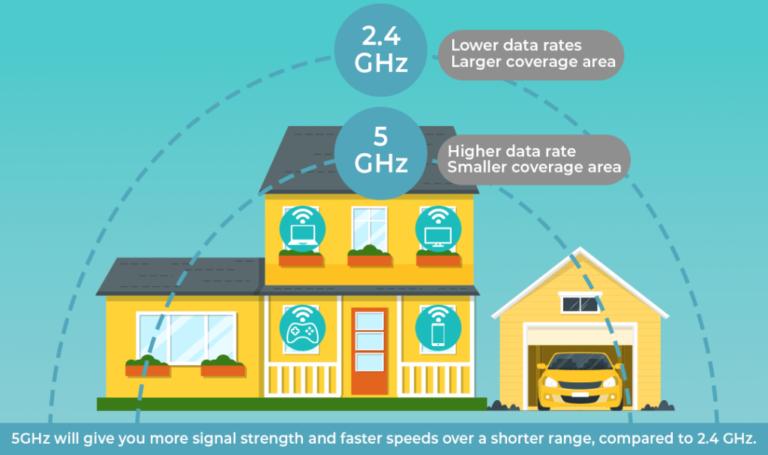

Router Placement in House
Proper router placement in house can dramatically affect your WiFi speed, coverage, and reliability. Indeed, even the fastest internet plan can underperform if the router is placed in a suboptimal location. Moreover, walls, furniture, and electronic devices can interfere with signal strength, leaving some areas of your home with weak or unstable connections.
Fortunately, by understanding the principles of router placement, you can maximize coverage, reduce dead zones, and ensure all devices get the best possible speed. As a result, simple adjustments like moving your router to a central location, elevating it, or avoiding interference sources can make a noticeable difference. In this guide, we will explain how to position your router effectively, what common placement mistakes to avoid, and tips to enhance WiFi performance throughout your house.

Why Router Placement Matters
Many homeowners overlook the impact of router placement. Even high-speed internet plans won’t solve slow connectivity if your router is poorly positioned. Correct placement ensures:
- Consistent Wi-Fi coverage across all rooms
- Strong signal for streaming, gaming, and video calls
- Reduced interference from walls, electronics, and furniture
Research indicates strategic placement can boost Wi-Fi performance by up to 50%, essential for households with multiple devices.
Best Router Placement Tips
Centralize Your Router
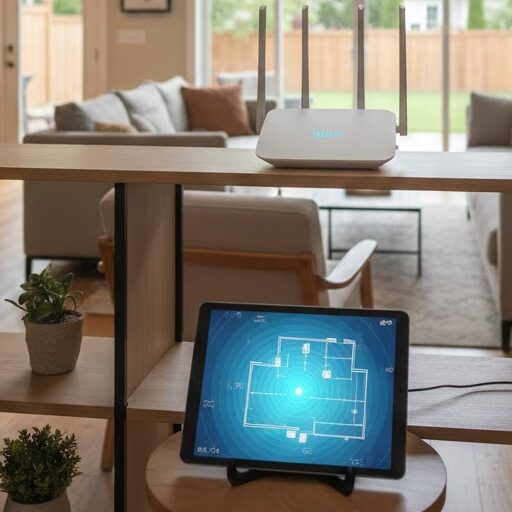
Placing your router centrally in your home ensures even Wi-Fi distribution. Avoid corners or exterior walls where signals may escape or be blocked.
Avoid Obstructions
Keep your router away from walls, metal objects, and large furniture. Elevate it on a shelf for better signal spread.
Elevate Your Router
High placement reduces interference. Mount routers on walls or place them on high surfaces for optimal coverage.
Keep Away From Electronics
Maintain distance from microwaves, cordless phones, and baby monitors to prevent signal interference.
Optimize Router Antennas
Position antennas perpendicular to each other one vertical and one horizontal for better floor-to-floor coverage.
Consider Open Spaces
Open areas let signals travel freely. Avoid placing routers inside cabinets or behind TVs.
Router Placement for Different Homes
Small Apartments
Place your router centrally or in the main living area for sufficient coverage. A single powerful router is often enough.
Multi-Story Homes
For multi-story homes, placing the router centrally on an upper floor helps cover both levels. Mesh Wi-Fi systems can extend coverage effectively.
Large Homes
Use Wi-Fi extenders or mesh systems for full coverage. Centralize the main router and position nodes in weak signal areas.
Click the link to Learn more Wi-Fi tips
Common Placement Mistakes
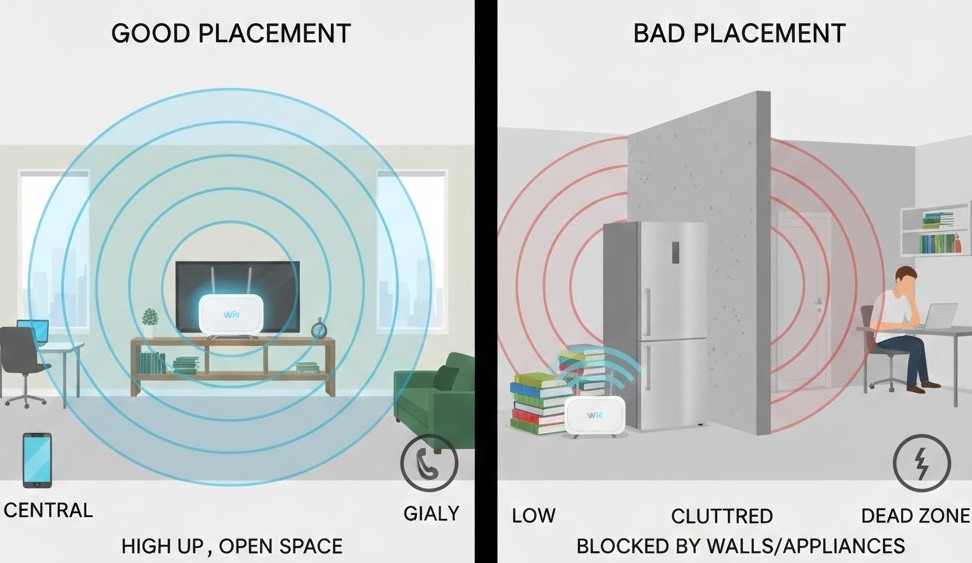
- Hiding the router in cabinets or closets
- Placing it in a corner
- Keeping it near interfering electronics
- Setting it too low to the ground
Using Technology to Improve Placement
Wi-Fi tools can help you find weak signal areas and adjust your router for better coverage. Mesh systems spread the signal more evenly, while newer routers like Wi-Fi 6 models improve speed and range.
Simply put, smart tools make Wi-Fi optimization easier and more effective.
Wi-Fi Analyzer Apps
If you’re not sure where your signal is weak, Wi-Fi analyzer apps can help. Tools like NetSpot or Wi-Fi Analyzer show you signal strength in different parts of your house and help you spot dead zones.
As a result, you can move your router to a better position instead of guessing. They also help you find less crowded Wi-Fi channels, which can improve speed and stability especially in apartments.
Mesh Wi-Fi Systems
If your home is large or has multiple floors, a single router might not be enough. That’s where mesh systems come in.
Mesh Wi-Fi uses multiple devices (called nodes) placed around your home to spread the signal evenly. This reduces dead zones and keeps your connection strong as you move from room to room.
Upgrading Router Hardware
Sometimes the issue isn’t placement it’s an old router. Newer Wi-Fi 6 routers offer faster speeds, better coverage, and improved performance when many devices are connected.
So, if your router is several years old, upgrading it can make a noticeable difference.
FAQs; Router Placement in House
Q1: Why does router placement affect WiFi performance?
A: Indeed, the position of your router directly impacts signal strength and coverage. While routers emit signals in all directions, walls, floors, and furniture can block or weaken the signal. Moreover, interference from other electronics, such as microwaves or cordless phones, can further reduce WiFi quality. Therefore, placing your router strategically can eliminate dead zones and improve speed throughout your home.
Q2: Where is the best place to put a router in a house?
A: Generally, the best location is central and elevated, away from thick walls or metal objects. Additionally, avoid corners, basements, or enclosed cabinets where signals are obstructed. Consequently, devices in every room can receive stronger and more reliable connections, which is especially important for streaming, gaming, or video calls.
Q3: Can moving a router really improve slow WiFi?
A: Absolutely. A simple adjustment, like relocating your router to a more central spot or away from interference sources, can significantly boost WiFi speed and stability. Furthermore, combining optimal placement with proper antenna orientation ensures maximum coverage for all devices in your home.
Q4: Are there tools to help with router placement?
A: Yes. WiFi analyzer apps or heatmap tools allow you to measure signal strength in different areas. By using these tools, you can identify weak spots and adjust your router placement accordingly, ensuring consistent performance across your home network.
Further Thoughts
Router placement is often overlooked, yet it is one of the simplest ways to improve home WiFi. As more smart devices, laptops, and streaming equipment connect to your network, poor placement can lead to slow speeds and intermittent connections. Moreover, modern routers often include features like beamforming or dual-band support, but these features cannot fully compensate for a poorly positioned router.
Consequently, evaluating your home layout, identifying interference sources, and testing different locations can make a noticeable difference. Furthermore, small adjustments like raising the router, orienting antennas correctly, or keeping it away from electronics can drastically improve signal strength and consistency. Ultimately, strategic router placement ensures a more reliable, faster, and enjoyable internet experience for everyone in your household. CNET Router Placement Guide

Conclusion
In conclusion, the placement of your router in a house is a crucial factor for optimal WiFi performance. Indeed, even high-speed internet plans won’t solve slow connectivity if the router is poorly positioned. Moreover, proper placement reduces dead zones, improves speed, and ensures devices maintain stable connections.
Therefore, take time to assess your home layout, avoid interference, and position the router centrally and elevated. Consequently, combining optimal placement with simple maintenance, such as firmware updates, can maximize performance and extend the life of your network equipment. Ultimately, understanding and applying strategic router placement transforms your home WiFi into a faster, more reliable, and more efficient network benefiting work, entertainment, and daily connectivity.